


Hey there! Welcome to a new edition of my monthly updates on how I build Tolaria.
Once a month, I share how the project is going: an overall recap, the latest updates, and what I learned along the way. Everything comes from real experiments, including the parts that didn’t go as planned!
This is a big edition: I am introducing our brand new iOS app and massive updates to the coding workflow!
Tolaria itself stays free and open source thanks to the Tolaria Alliance and the tools I use every day:
CodeScene: keeps code health high across the codebase. It’s one of the gates every push has to pass.
Codacy: code quality and security. This month it also got a new role in my agent setup, more on that below.
Unblocked: helps agents (and me) find context across the codebase, ADRs, GitHub issues and commit history.
CircleCI: our CI. This month we moved the main pipeline over completely, and it got about 4× faster!
If you missed the previous episodes, last month we talked about moving agents from local machines to the cloud, and earlier chapters covered how I run the Tolaria project and guides, gates and guards.
Here is the agenda for today:
🐢 Why releases have been slower — a personal note, before the news.
📱 Introducing Tolaria for iOS — with Android coming soon!
☁️ Cloud dev environments — plus Verity, and how agents access tools.
🤖 Growing the bot family — the assistants that help me run everything.
🔭 What’s next — Tolaria on the web, and inside your agents.
Let’s dive in!
🐢 Why releases have been slower
I want to start with a small apology, as you may have noticed that Tolaria releases have been slower these last couple of months.
The truth is, after the big rush of the first months, I took some time off. This gave me some space to look at how I was working from a distance, and reflect.
I believe my #1 mistake has been to allow my attention to spread too thin across a deluge of small things every day instead of fewer, bigger bets that would truly make a difference. This is understandable because Tolaria has a massive surface for bugs and small tweaks, as it: 1) runs on multiple OSes, 2) works with multiple AI agent hosts, 3) works with the file system, the CLI, git, and 4) just does a lot of things! So I can literally fill up all of my time just working on the small improvements that people report on every day.
This felt productive, but over time I also got stressed and less motivated by that kind of work. So I took a step back, got back to the drawing board, and this is what I want to do now:
Invest most of my time in the big bets — define the few clear areas that need most of my human taste and strategy input. For me right now, these are mobile, a web version of Tolaria, and how Tolaria works with agents (more on all of these later!)
Create a good workflow for the small daily improvements — good product experience is made of a thousand small things, so the little daily tweaks count. But it’s important that I keep improving my workflow so that these get done without draining my energy, and the product keeps improving, instead of degrading.
All in all, I am figuring this out as we go, so thanks for sticking with me.
Anyway, the good news is that, from now on, things are going to get much faster. Over these months, I pretty much rebuilt how I work: the new setup lets me do much more in parallel, and scales much better than before. You can see the first results in the updates below, starting with the biggest bet of all, which is ready for you to try 👇
📱 Introducing Tolaria for iOS
The big news of the month is: Tolaria now runs on iPad and iPhone. 🎉
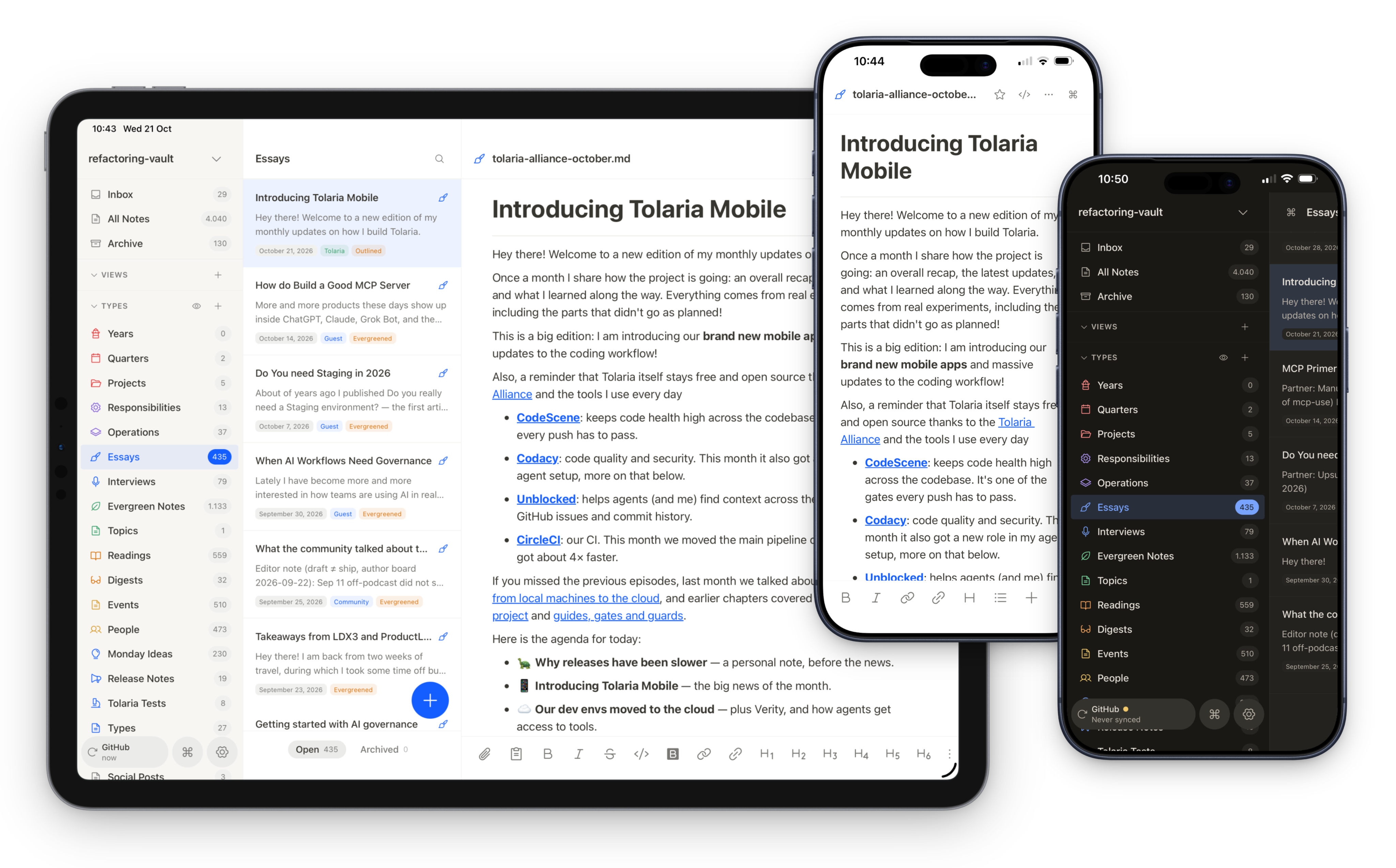
Mobile has always been, far and away, the #1 requested feature on our product board. If you run an iOS device, now it’s here for you to try.
But also let me be honest. The apps are still in a rough state: some parts are ugly, some are bugged, and some probably won’t work at all. But the core of what makes Tolaria useful is already there, and works on both iPad and iPhone. Like, for example:
The visual Markdown editor, with slash commands, properties, and source mode.
Real Git push and pull with auto-commit, and two-way sync with an iCloud or Files folder.
The command palette, plus iOS gestures and rotation.
19 languages, like the desktop app.
Some of the rough edges include: git sync being limited to repos you clone from GitHub (with Github sign-in), large vaults are kinda slow to clone, and the app just crashing sometimes. Also, no AI yet, but coming soon.
The iOS app is available today on TestFlight. And since Tolaria is open source, you can also check out the source code and compile it yourself!
Also, I also created a brand new Discord server to talk about all things Tolaria. I will also use it to post changelogs and announcements, and I will engage personally with the community. You can join below:
Finally, a couple of FAQs:
What about Android?
Because the app is built in React Native, Android is coming soon. I just haven’t had much time to test it yet, and I’d rather ship it when I’m confident it works well. But of course, you are welcome to try it from the source, and submit PRs to make it better.
Why React Native?
You might have seen that Shopify recently announced it’s moving its mobile apps from React Native back to native Swift and Kotlin. They had gone all-in on React Native in 2020, and they explain that coding agents have made building each feature much cheaper, so native is now viable and keeps them closer to platform capabilities.
So could I have gone native? Maybe yes, but what really moved the needle for me were over-the-air (OTA) updates. With OTA, I can push fixes and improvements straight to users, without waiting on reviews each time. Now that agents can ship very fast, that felt table-stakes to me. And yes, there is also some code we can share between the desktop and mobile versions, but it’s not a lot anyway, so it was not a primary factor in the decision.
Let me know your thoughts, and on to the next updates 👇
☁️ Cloud dev environments
Last month I wrote about my agents moving from local machines to the cloud. This month, the whole development environment followed.
1) Three coding agents, two of which in the cloud
Before, my coding agent ran on my Mac Mini with Codex, doing one thing at a time. Simple as that! In September, it had become already obvious that this was extremely inefficient:
Doing one thing at a time was no longer enough, given the various work threads: desktop, web, and mobile.
Mobile access was cumbersome, and so was access for other agents (e.g. Grok Bot)
Long-tail reliability issues were real: I got a brief power outage while a was away, stalling work days; macOS sometimes really wants to restart; Starlink goes down, etc.
So, since early October, I have moved most of the work to two Linux machines on Hetzner: one of them runs Codex, and the other runs Claude Code. I also still use the Mac mini for the iOS mobile work and builds.
Having both an OpenAI and Anthropic stack is useful for many reasons, like being able to immediately test new models, and use tools that are specific to one of the two stacks, like Verity, which I use with CC.
This setup also completely untethered coding from my machines, and I can now drive work from my “PM” Grok Bot agent, who in turn SSH into the coding machines.
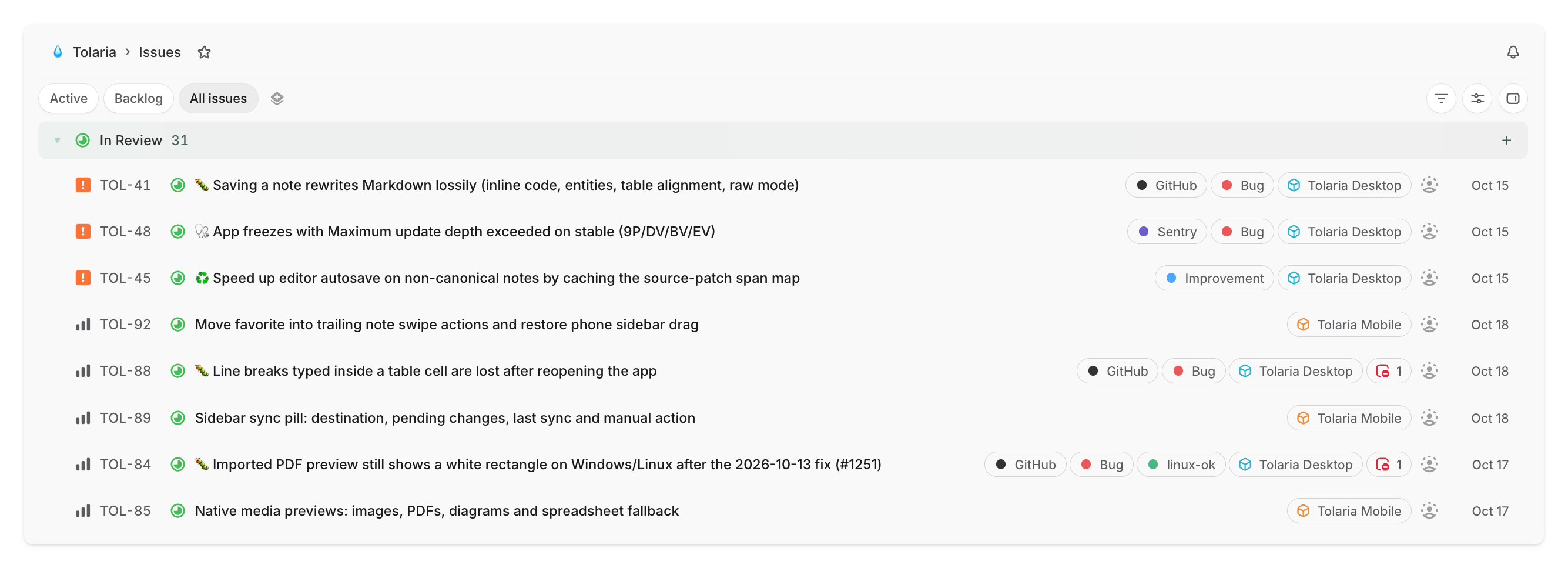
2) Welcome Linear
I also moved from Todoist to Linear for tracking work.
All the work the agents pick up now lives in Linear, which provides cleaner (and deeper) abstractions for product dev work, and also better agent integrations.
This is still early, so I don’t have a lot to say about it, but the integration has been seamless so far, and I am learning how to use it best.
3) 4x faster CI with CircleCI
On the CI side, we moved from GitHub Actions to CircleCI, and the main pipeline went from about 15–16 minutes to ~4, which is roughly 4× faster!
Locally, every push still goes through the same Husky gates, performed on the CircleCI sidecar chunks, largely in parallel: CodeScene (10/10), Codacy (zero new findings), unit tests, and Playwright smoke tests.

4) Using Verity
I started using Verity, a new product from the team at Codacy, on my Claude Code machine.
When the coding agent completes a task, Verity checks the change for quality, security and whether it matches the product’s tech strategy, using AI review, static analysis and formal proofs in Lean. It either passes the change, or blocks and hands the fix to the agent.
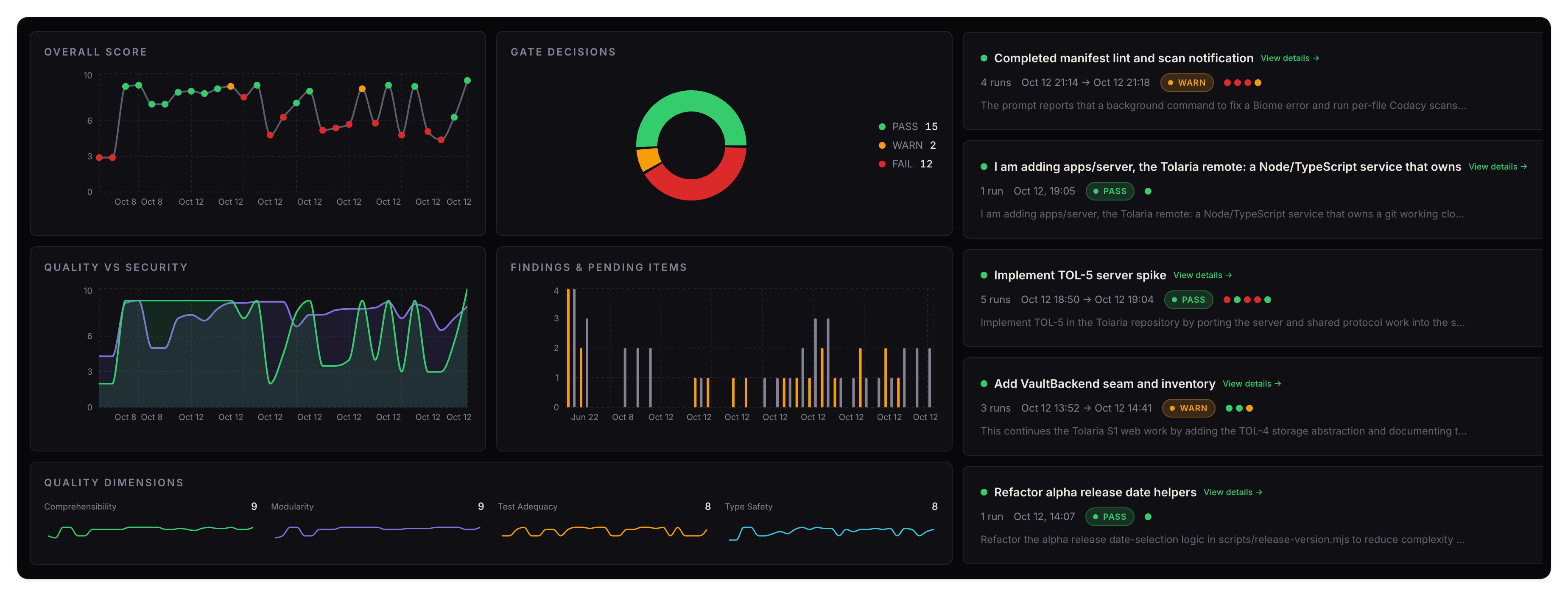
With respect to other tools, what sets it apart is the knowledge base concept. Every important decision gets recorded alongside my ADRs and docs, so future sessions learn from past ones and don’t repeat the same mistakes.
It has already blocked several changes, for legit reasons. I like it so far, and I like the dashboard it includes, where you can check runs, usage, the knowledge base itself, and more. Free during beta, with v1 launching in the coming weeks.
5) Centralized access to tools
With more agents doing more work (including Grok Bot, see more below), the way we used to handle credentials got really messy, with tokens scattered across machines, configs and bot settings.
I first moved agent access to tools into 1Password, but it didn’t work super well so I developed a small custom vault service. Every agent has its own identity, looks up the logins it needs, and can create new ones. It’s a small thing on paper, but it made the whole setup feel a lot more manageable.
It’s also way easier now to spin up new agents on any agent host, as I can simply give it access to the vault.
🤖 Growing our Grok Bot family
Behind all of this, there’s a growing family of assistants.
In September I ported my non-coding agents to Grok Bot, and this month we expanded on it, spawning more of them for dedicated areas, and it has all been working very well.
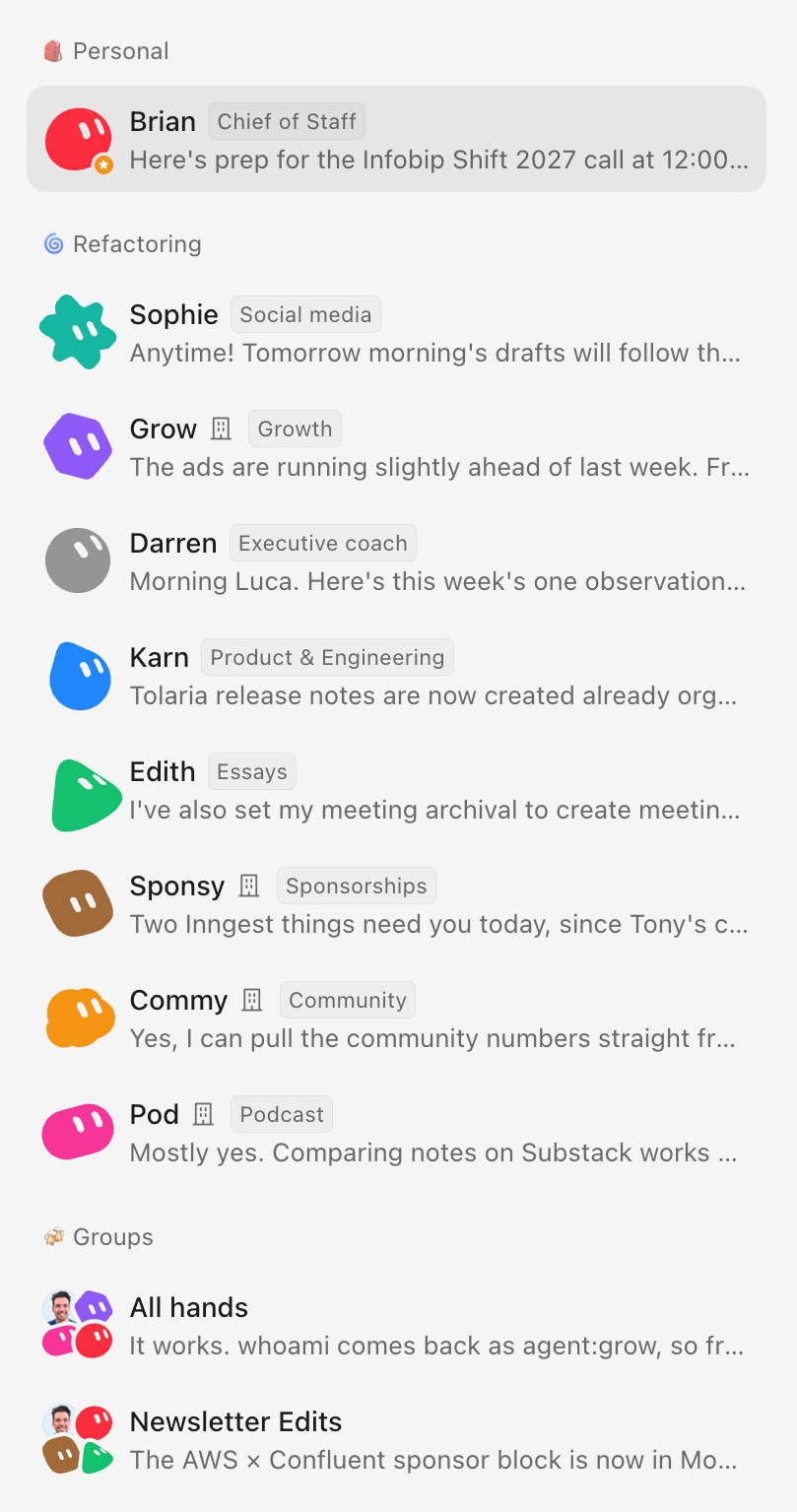
I don’t think it’s worth going into detail about what each bot does, but here are general lessons we have learned in the process:
Make spawning new agents as easy as possible. We developed the vault for credentials, and a small custom tool to automatically connect new bots to Slack. Unsurprisingly, the less friction there is in delegating and scaling work, the more work you will delegate and scale!
Shared team bots + personal assistants work great. Everyone on our team has a personal bot that acts as chief of staff, plus we have shared bots for the areas where we collaborate. This seems like a good pattern that is working well for us.
Mobile access matters a lot. If I had to pick just one reason why Grok Bot is winning for us, it would be mobile. Whatever agent host you use, make sure you create a good mobile experience (notifications, sync, voice notes, calls). Working with agents is more and more about doing many small things at random times, rather than sitting at your computer for long stretches, so mobile is an incredible enabler.
So far I’m very happy with Grok Bot itself. A big reason is also that it now runs models other than Grok under the hood, like Opus 5.5, and the difference in quality shows.
🔭 What’s next
Beyond mobile, two big things are coming next: Tolaria on the web, and inside your agents.
1) Tolaria on the web
Many teams have asked for a simpler, managed version of Tolaria. This doesn’t mean changing how the desktop app works: it stays fully offline-first, vaults are still cloned locally as Git repos, and so on.
What can change is the hosting.
Today, to share a vault with your team, you need GitHub or another Git host. That works, but it gets messy when it comes to managing permissions and onboarding people. A GitHub repo also has a pretty much all-or-nothing permission model: someone either has access to the whole thing, or they don’t. For code that’s fine, but for docs it’s limiting, especially once external contributors are involved.
So the question for me becomes: can we retain the core principles of Tolaria, while also bringing it closer to how Google Docs works, where you can share specific documents with colleagues and partners?
A web version of Tolaria, that also hosts your file, is the natural place for that. Like the rest of Tolaria, it will be open-source and self-hostable. But we’ll also offer a simple managed option you can pay for, priced very cheaply.
Work is already underway!
2) Tolaria inside your agents
Last week I wrote about how to design a good MCP server, and the backdrop to that piece is that more and more work is obviously happening inside agent hosts.
I expect docs to follow the same path: more and more people will add to and edit their Tolaria vaults through agents, in their favorite agent environment, rather than inside Tolaria itself.
It’s already true for me, by the way! Tolaria is at the center of my workflow and the source of my knowledge base, yet, the more my agents get good at working on it, the less I use it directly.
So we want to build good plugins for all the major agent hosts (Grok Bot, Claude, ChatGPT, Codex). Also, not just tools for chatting with the agent, but also some UI and things you can do right inside the host. Today, Tolaria already ships a local MCP server with 12 tools, which register itself automatically. A few ideas we’re exploring for what comes next, none decided yet:
Live, editable note cards rendered inside the agent chat.
A hosted remote MCP, so ChatGPT and Claude can reach your vault (possible with the web version!)
We’re going to invest big here, because more and more work is shifting to those surfaces.
I’d love your help with this. If you use Tolaria through agents today, hit reply and tell me how. And if you try the mobile app, tell me what you think, rough edges included.
And that’s it for today! I wish you a great week
Sincerely 👋
Luca
Been using Tolaria for quite a while with Hermes, using Google OKF specs. The MCP and Git first are important features.
I knew there is a mobile version in your pipeline. Finally it is here.
I have introduced Tolaria to my friends that started using Hermes.
Thank you.