


This is a special edition of Refactoring and I am so excited about it!
By now, developing Tolaria is a big chunk of my working time (about 40%, to be precise). I like this balance and I am happy I can regularly write articles about AI coding coming from my own experience, as opposed to pure research.
I also don’t want to end up writing only about that, and so far I have kept a schedule of about once a month. This feels like is a good cadence: it’s feel overwhelming for readers, and gives me time to produce actual updates to the workflow, as opposed to posting always the same things.
So, today I am covering a few workflow updates, but most of all I am introducing a new set of partnerships I am very proud of.
So let’s dive in!
💧 The State of Tolaria
First of all you may wonder: how is Tolaria doing? Pretty well, if you ask me.
From a growth perspective, it has now almost 18K stars on Github, 100K+ downloads, and thousands of daily active users.
From a product perspective, this month we delivered a ton of updates, including some massive ones, like the support for native spreadsheets.
You can now create and edit spreadsheets inside Tolaria with Excel-compatible formulas in a completely open and portable format, which is basically CSV with a frontmatter on top.
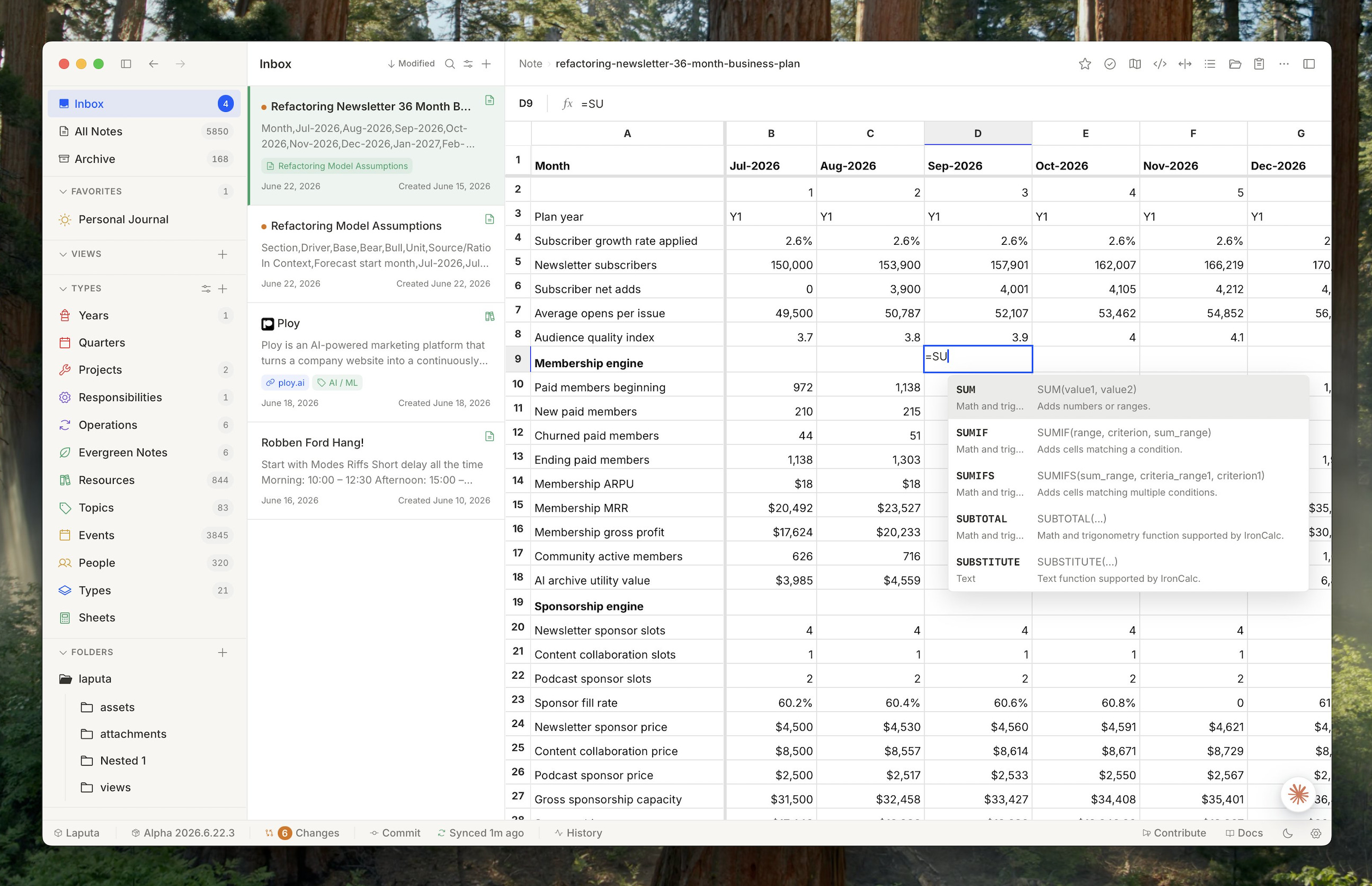
We also improved a lot of the editor experience, adding collapsible headings, block navigation, better spacing and typography, all while making everything faster than ever. If you haven’t tried it in a while, you definitely should!
I really enjoy developing (and using!) Tolaria, so the question recently has rather become: how do I make this work sustainable, while keeping everything free and open?
Enter our tech alliance!
🦸♂️ Creating our own Tech Alliance
The tools I use to develop Tolaria are no secret — you can figure out most of them by looking at the repo, the AGENTS file, hooks, and my own articles.
So, over the last month I reached out to the ones I use the most to figure out if we could work together to make the development of Tolaria more sustainable on my end via open source sponsorships, in return for me spreading the word about how I use such tools, and providing good feedback on how to improve them.
The result is an alliance that as of today includes four tools: CodeScene, CircleCI, Codacy, and Unblocked.
These partnerships allow Tolaria to stay free and open forever, and even give us the opportunity to accelerate by hiring a great product engineer (if you think you are a great fit, please reach out and say hi!).
So today I will tell you more about my workflow, which includes these tools — but first an ethical statement: I will only ally (and stay allied) with tools I personally use and believe are the best way to do what they do. As you will see these are non overlapping: each has its own job, so they really make for my tech stack. Over time we will also expand on this and create exclusive deals for Refactoring subscribers!
Before we talk about the tools, it’s worth refreshing how I think about controls for code written by AI. I have written about it in this recent piece 👇

In a nutshell, I steer AI output in three main ways:
↪️ Guides — instructions in the AGENTS file and skills. Not 100% reliable: the AI may or may not follow them.
🔄 Gates — deterministic checks that don’t let bad code move forward if some conditions are not met.
↩️ Guards — fallback procedures that typically run once a day to fix what goes through the cracks.
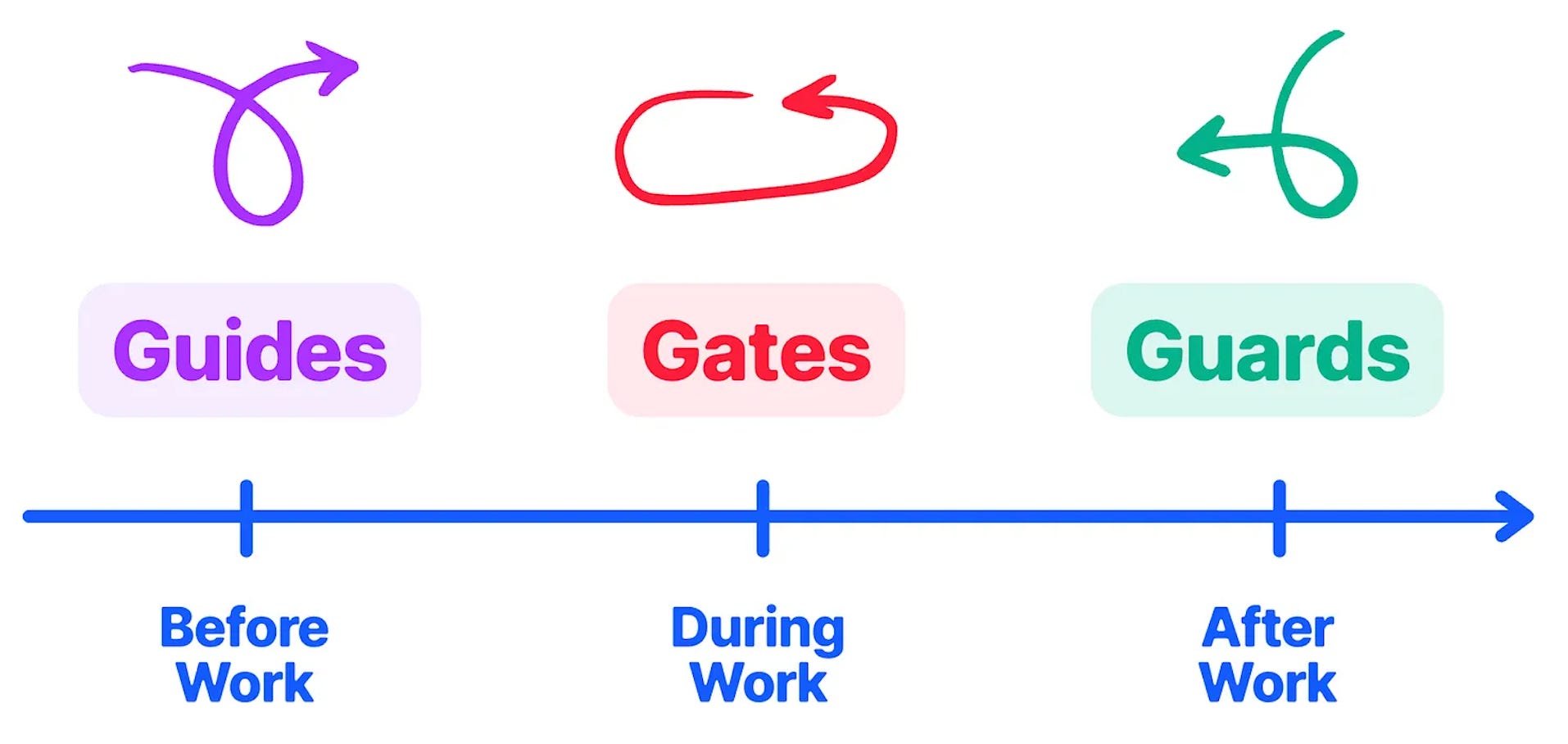
Out of these, the most important part is the gates, because they have the (deterministic) power to stop bad code, so the more I can express this way, the better. Most of the tools below are integrated this way.
So let’s go 👇
🩺 Code Health — with CodeScene
CodeScene probably needs no introduction because I have written about it many times here. I am a big fan of Adam Tornhill‘s work, which to me is about two big things:
A proprietary algorithm to calculate code health, that considers 20+ factors.
The “hotspot” approach, which looks at git history and suggests refactoring targets prioritizing files that are changed the most often.
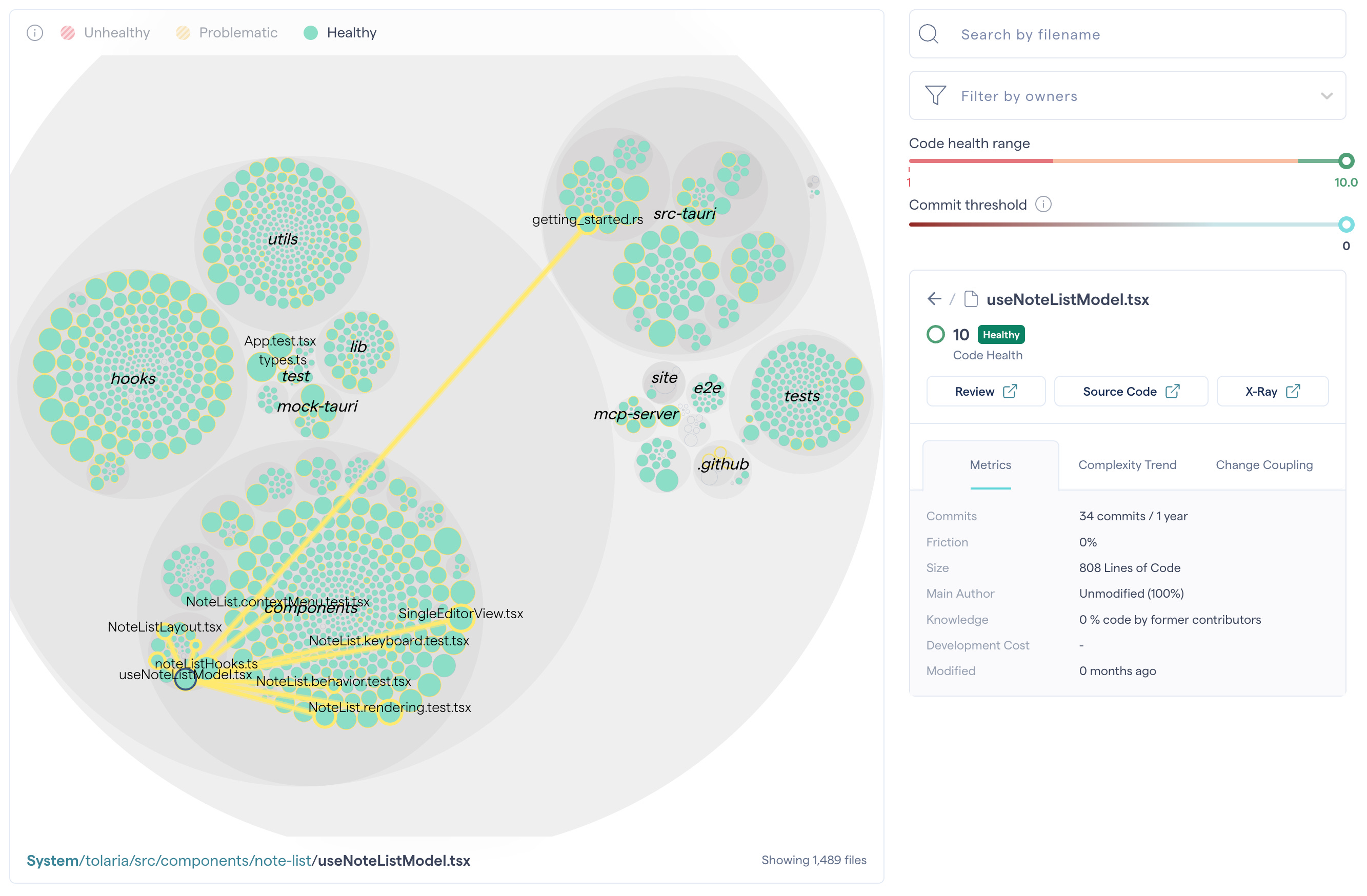
I integrate CodeScene as a hard gate in local hooks: new code can’t be committed if it’s not a 10/10. For modifying old code, the AI needs to follow the boy scout rule: leave the code better than it found it. So it measures the code health before touching the file, and after, and the score needs to be the same or higher.
After any commit that improves the overall codebase health, the AI also increases the thresholds, to create a positive flywheel.
After four months working like this, now the code has perfect health, and the current threshold is literally 10/10!
🔒 Security and Quality — with Codacy
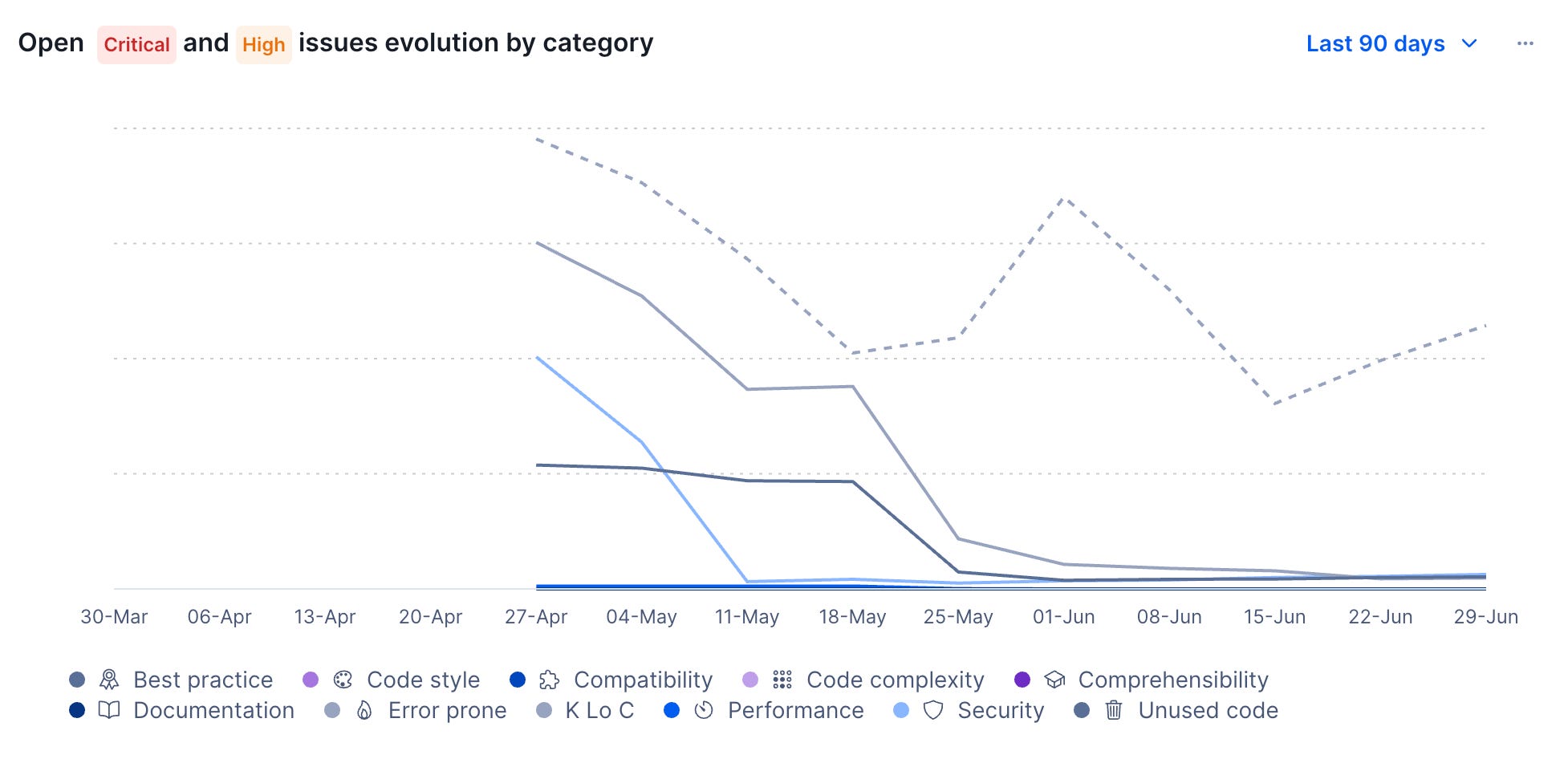
Codacy works on code quality too, but from a different angle: rather than scoring files, it surfaces individual issues.
Issues come with severity levels and belong to various categories, like security, performance, compatibility, code being error prone, and more.
Codacy has an MCP that I use to steer my Codex locally, and to implement an actual blocking gate before it pushes any code. All new code has to be issue-free, and when touching old code, the AI also needs to fix existing problems, other than making the business changes.
I am also working with the Codacy team on their new product Verity (you can join the beta for free here), that aims to steer agents’ work by creating a knowledge base of past decisions.
This is interesting to me because I do that with ADRs, and would love to create more reliable controls against code that violates them. Verity is promising about that, and should also track token efficiency and a bunch of process metrics that I am interested in improving over time.
✅ Validation — with CircleCI
A few months ago I made a change in how I run our test suite, creating local hooks with Husky so that AI agents can immediately see if controls fail, instead of waiting for the remote CI.
This was very effective at improving the agents’ work, at the expense of completely hogging my machine every time. Some parts of the test suite are particularly heavy (e.g. playwright), and running them in local means the whole thing takes time — about 15 mins — and parallelizing things is out of question, because resources are not enough. It’s tricky to run even just 2 worktrees at the same time: things sometimes literally crash.
I talked with Rob Zuber from CircleCI about this, and they implemented a great solution: local hooks that are run remotely, in what they call Chunk Sidecars.
Sidecars are preconfigured environments that run alongside your local workflow, and validate changes as they happen.
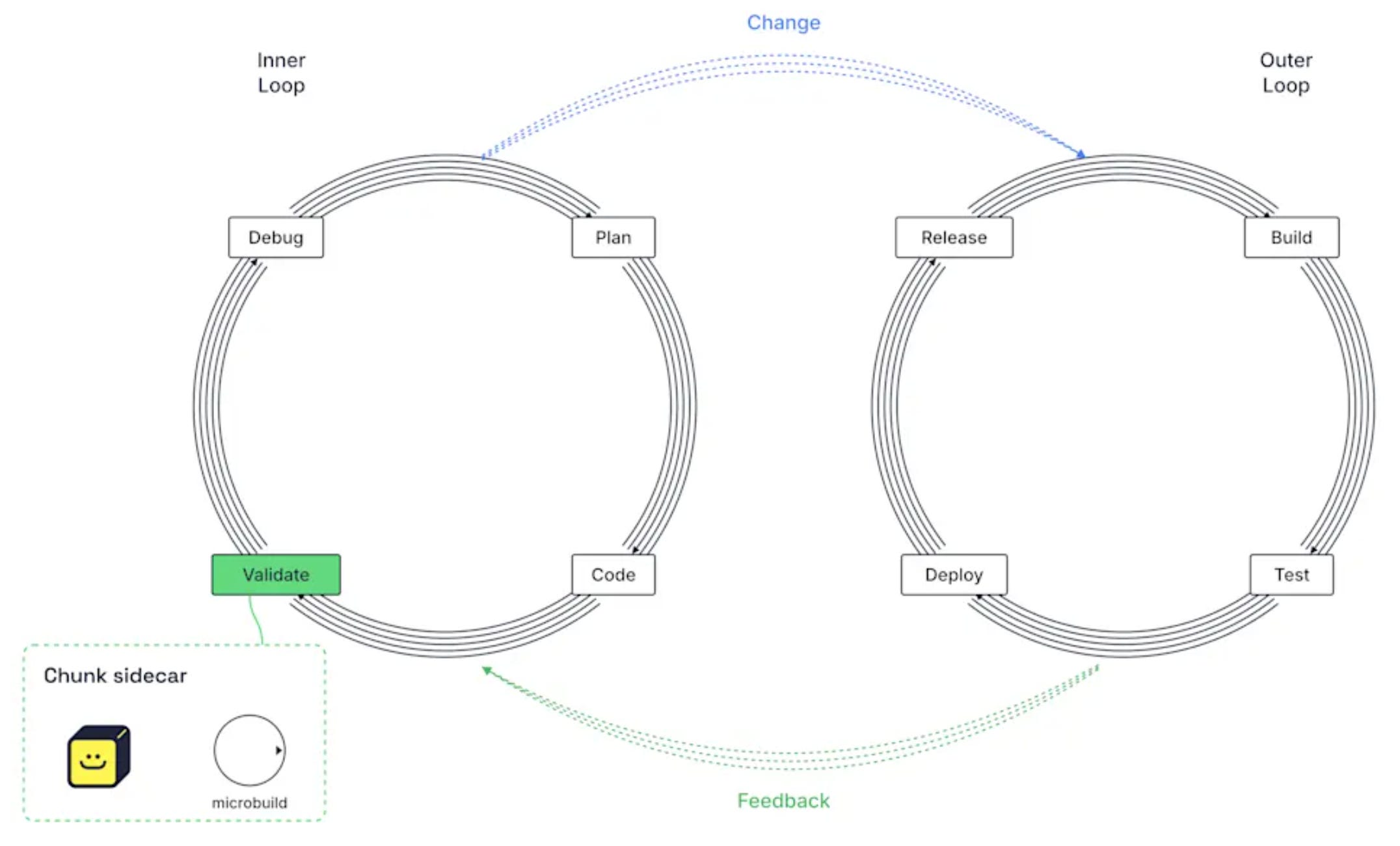
This allows to 1) free up your machine resources, and 2) make things faster by introducing real concurrency.
This way I have been able to reduce the suite run time from 15 to 4 mins, while also being able to spawn more worktrees safely. A massive win!
📖 Fetching knowledge — with Unblocked
Unblocked is a context engine: it takes information from several sources (e.g. Github, Notion, Slack, Datadog, ...) so you can ask questions about it.
I have known Dennis, Claire, and the team at Unblocked for a long time, but didn’t think of using it for Tolaria until just recently, because I thought that Unblocked would shine when you have many information sources, and we legitimately don’t have many.
I was wrong.
I plugged it about one month ago, connecting it to Github and Sentry. Sentry is useful to triangulate issues, but the Github connection would basically be worth by itself, because it indexes the code, the ADRs, and all the history of changes.
I have been asking questions about how we do this and that and checking side by side with Codex (which instead just greps and fetches things on the go) and the difference in speed and accuracy is just obvious.
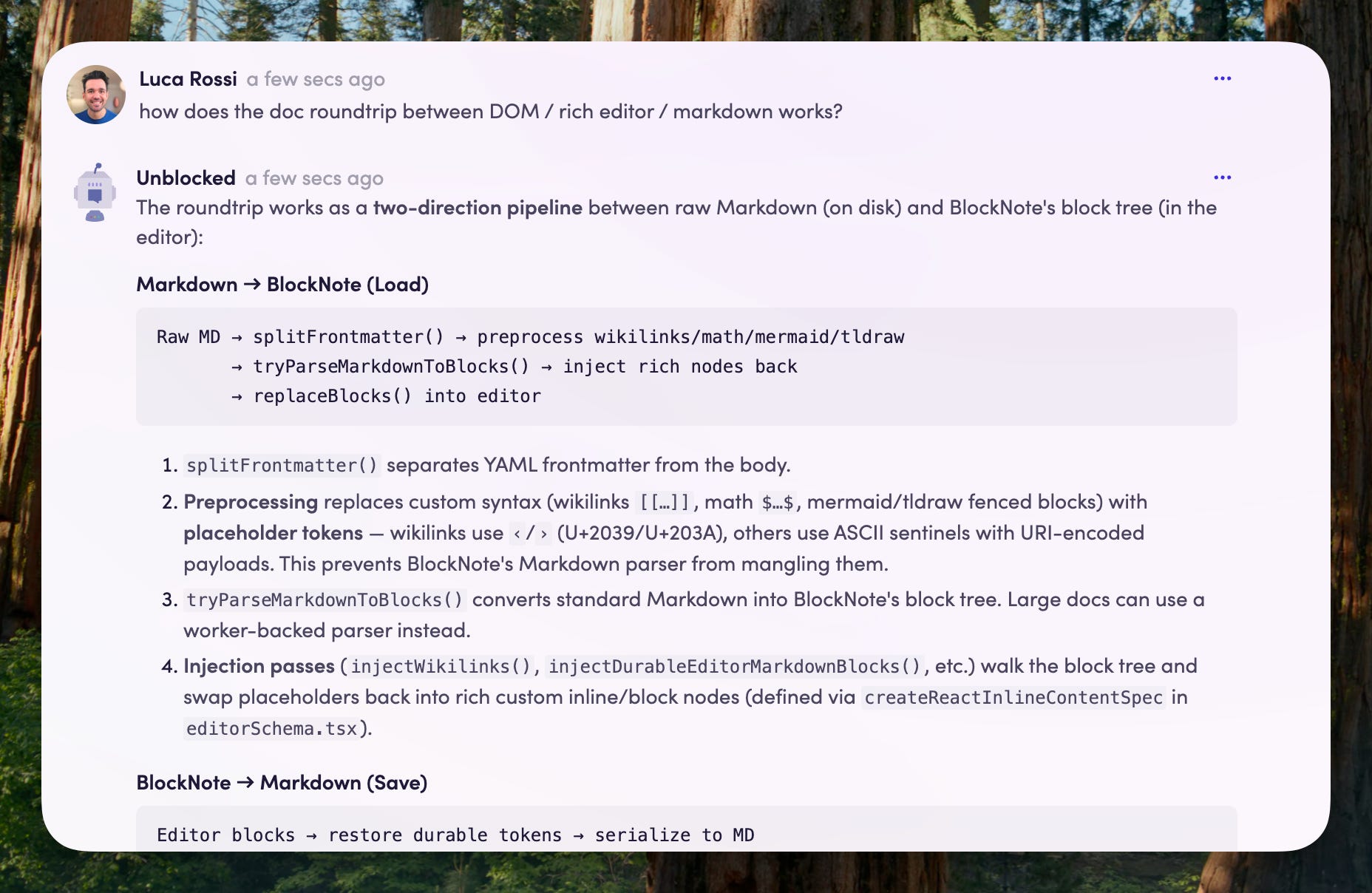
Even more importantly, Codex itself uses Unblocked via the MCP to understand past decisions and fetch relevant ADRs.
Big props to the Unblocked guys because this was an easy win and largely plug-and-play!
🔭 What’s next
Now that Tolaria has sustainable funding, I am going to invest even more on it. Again, I am exploring hiring a strong product engineer, so if you think you can be a good fit, feel free to reach out and say hi!
As for future work, the most important thing ahead is the mobile version.
I already have a working prototype for iPad, but there are still a lot of rough edges. Also, the iPad version is the easy part: for smartphones we need to completely reinvent the UI — I have been working on it 💪
And that’s it for today! I wish you a great week
Sincerely 👋
Luca