


Hey, Luca here! This is a 🔒 weekly essay 🔒 from Refactoring! To access all our articles, library, and community, subscribe to the full version:
By now, chances are you have heard about the open-source AI assistant OpenClaw / Moltbot / Clawdbot. I have been using it extensively for two weeks now, and I want to share some thoughts about my experience with it.
I feel the need to do it for three reasons:
1) Signal — while there is a lot of information and stories online about OpenClaw, I have found most to be either shallow or inaccurate. Inaccurate is also an understatement: many takes are so comically bad/wrong/false that it is obvious that the author didn’t even bother to install OpenClaw, and is just remixing and regurgitating other (equally bad) content.
2) Impact — my experience with OpenClaw has been absolutely transformative and only comparable, AI-wise, to the launch of ChatGPT. YMMV and I don’t expect my experience to apply verbatim to everyone, but I suspect many people don’t understand what makes OpenClaw special, because it’s hard to see it from a distance.
3) Future — finally, this spectacular success gave me a lot to think about when it comes to the future of software and work in general, on which now I have thoughts that I want to share.
So here is the agenda for today:
🦞 What is OpenClaw — very briefly, for those who don’t know.
🔨 What I do with it — on a daily basis.
🔒 Security — keeping it real but also debunking some misconceptions.
And three theses:
🪨 Slaves vs software — AI enables a new (but also old) way to solve problems.
🔌 MCPs are dead — AI has clearly outgrown MCPs at this point, and not just them.
🪴 Personal leverage — learning from the story of Peter Steinberger, creator of OpenClaw.
Let’s dive in! You are in for a ride.
🦞 What is OpenClaw
OpenClaw is an open-source AI assistant you can install on a computer, plug into a number of tools, and make it do stuff. At its core, that’s it!
It is similar to Claude Code, but it comes with more features that work (kinda) out of the box, including, most notably:
🧠 Memory — it has a memory system to store things it wants to remember into files.
⏱️ Heartbeats / cron jobs — it can do recurring things when instructed to do so (e.g. every 4 hours send me a recap of my inbox and items that need my attention)
💬 Chat tools — it plugs into Telegram, WhatsApp and a few other tools for easy comms outside of the terminal.
It has a number of other features, including the ability to spawn subagents for long tasks, a big gallery of community plugins, and much more, but I believe the three above are what makes it stand out vs other assistants out there.
And the reason is all about UX.
There is nothing in OpenClaw you couldn’t already do with e.g. Claude Code plus a bunch of plugins / duct-taping, but the value here is convenience: the core parts are all pre-packaged, plus you’ll find a long tail of quality of life improvements that stem from the tool being intentionally designed as an assistant, as opposed to a coding agent.
So, it’s similar (on a small scale!) to when Steve Jobs introduced the iPhone as the combination of three things: a 1) widescreen iPod, a 2) mobile phone, and 3) an internet communicator. None of these were mindblowing in isolation, but put together they crossed some invisible line that turned the device into something else.
What is this something else, for OpenClaw? Well, let’s see.
🔨 What I do with it
The best analogy I have for OpenClaw is that of a person you have hired and you manage as your direct report. Yes, I know comparing AI to people is bad and out of touch in many ways, but I still find it the best model to build an intuition of how to relate with it and get the best out of it.
Like you would do with a person, you can tell OpenClaw to do things, do them on a recurring basis, have it report to you at some cadence, improve based on feedback, and it will happily do all of that. You will meet hiccups every now and then and stuff you’ll need to tweak, but for the most part, everything just works.
So, what to do with it is really up to you and what you need the most help with.
For me, as a content creator and owner of a small company, my highest leverage usage right now is that of an executive assistant, or a VA, that can lift some ops / admin work from my shoulders.
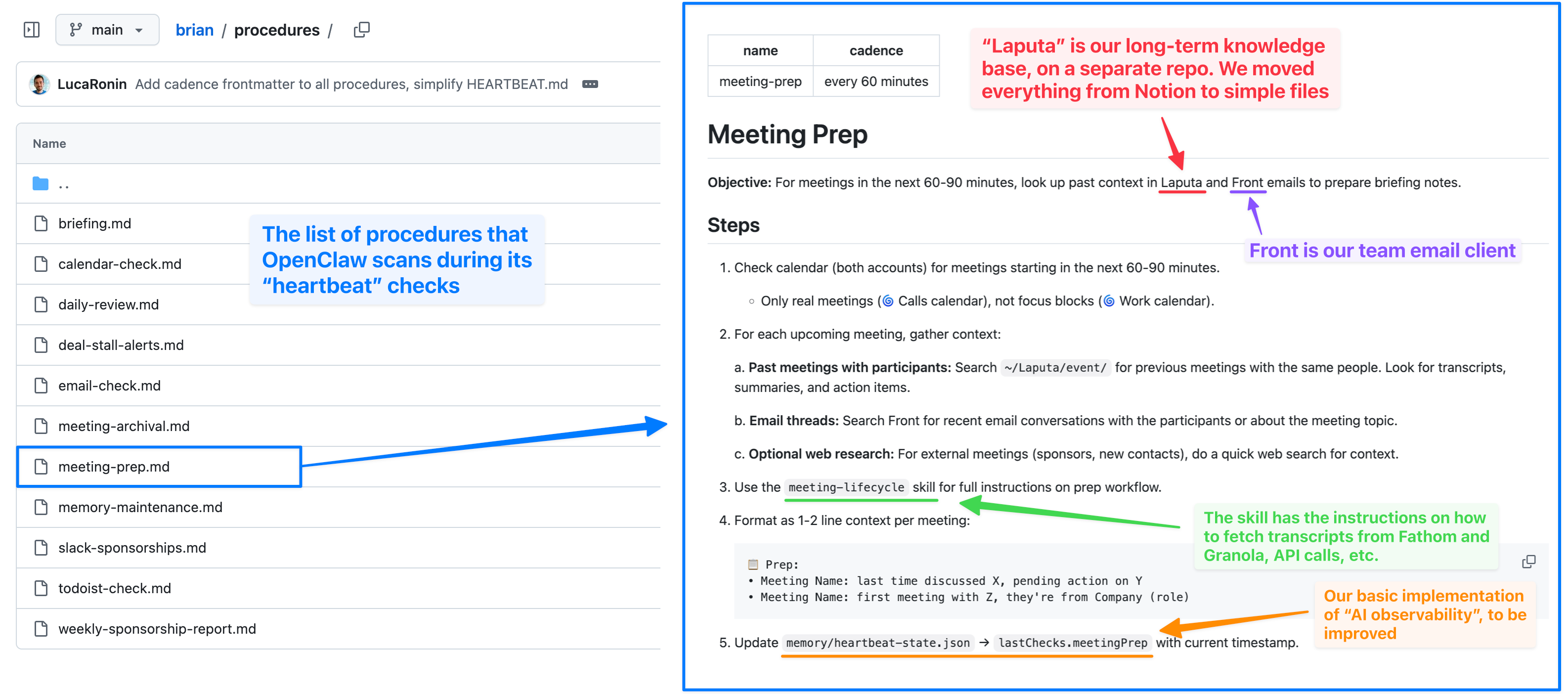
For example, right now OpenClaw:
Sends me morning briefs about what I need to do during my day.
Sends me prep for my upcoming meetings based on previous meetings and email threads with the same people.
Stores and organizes meeting notes automatically.
Does occasional coding work — e.g. it migrated all my Notion workspace to files, linking everything correctly.
Plus does a lot of glue work that would otherwise require n8n-style automations.
And it’s great at one-off tasks too:
I told it to draft an agreement with a partner company without adding any further context, because it could fetch it from email, Slack, meeting transcripts, and internal notes.
I asked it to give me the copy for the next sponsorship placement. It did that by looking at our sponsorship calendar on Airtable to figure out what company was next up, plus fetching the actual copy from the right email thread.
It did both without the need for complex instructions — just explaining the work in a sentence or two like I would with a human.
To enable all of this, we have connected it to basically all the tools we use for work, including: