
My AI Coding Workflow
To ship high-quality software that you don't need to write (or... read).
I admit I was one of those who didn’t believe Dario Amodei when he said last year that AI would soon write 90% of the code. Instead here we are. There are indeed teams I personally know who are having close to all of their code written by AI, and are having the time of their lives.
And it’s not random teams: it’s usually the best ones. If you don’t trust my anecdotal evidence, just look at recent reports. The very best teams, who had the best DX and code quality before AI, are the same who are getting the most out of AI today.
Still, it’s not 100% clear how these teams work with AI. The internet is full of opinion pieces and people sharing their CLAUDE.md files, but these feel tactical at best, and dubious/fake at worst.
I don’t want to add more of these. The proof is in the pudding, so I said to myself: if I want to write about AI coding, I need to build something.
So here we go.
For the last 17 days, I have been working on a personal project for a macOS app. Scope and complexity are daunting enough to force me to think architecture, buy vs build, performance, rich UI, and everything I would need to cover in a real—not toy—software project. And needless to say, I would never be able to pull this off without AI.
Before I give you more details, let’s start with what I got today so far:
772 commits in 17 days, for ~20,000 lines of code overall.
90% test coverage — via 500+ unit, integration, and E2E tests.
9.3/10 code health — as measured by CodeScene.
A clear, hierarchical set of docs — to navigate architecture, abstractions, and codebase structure.
A perfectly usable MVP — which I am, in fact, using every day.
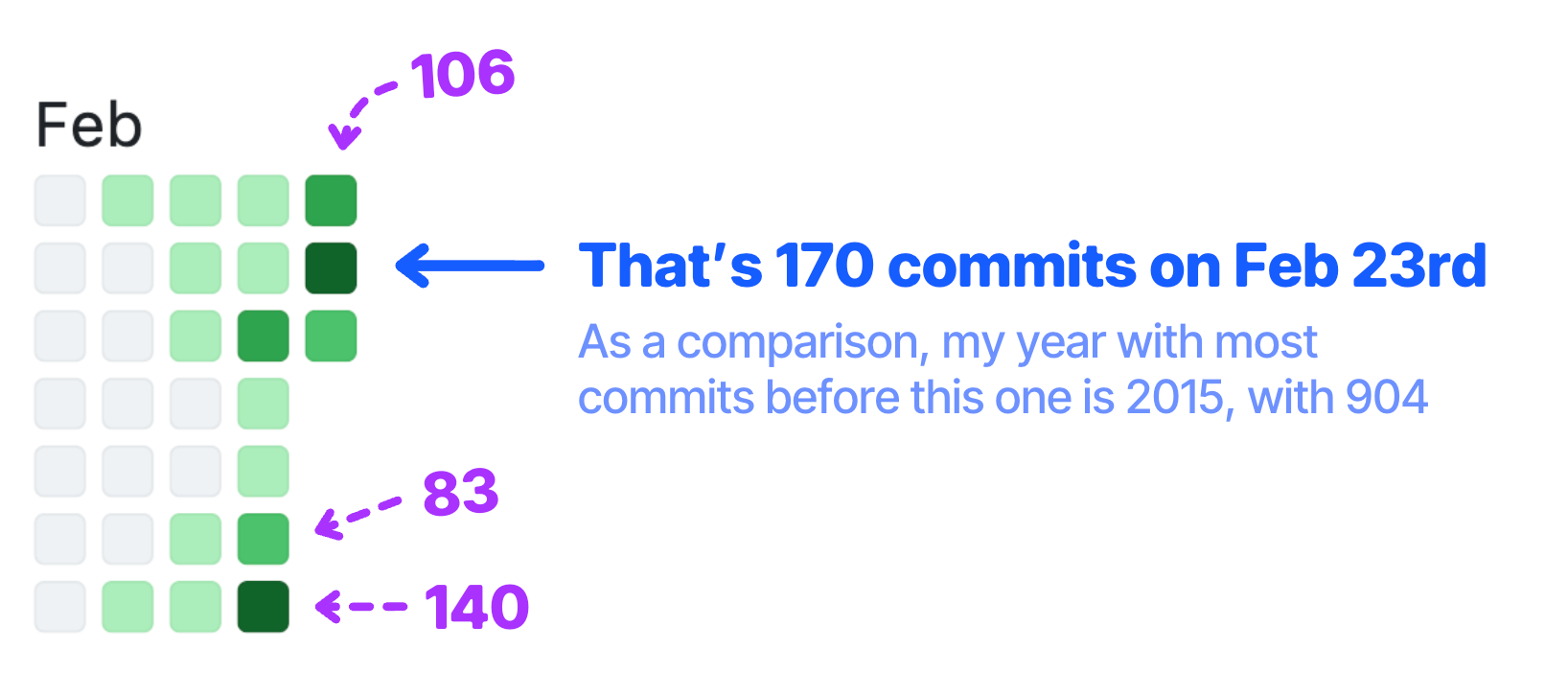
I figured out and improved various parts of the workflow over time, so that now I am comfortable with:
Not writing any code.
Not reading almost any code. Say I read ~5% of it.
Not providing UI design for ~90% of the features.
Managing most interactions async via voice notes.
Having AI work autonomously for long stretches of time, so I can do something else in the meantime.
So let’s dive into all of this, in detail. Here is what I am going to talk about:
🖥️ What I am building — because nothing else matters.
🎨 My product workflow — how I work as a PM.
🔬 How I keep tech quality — how I work as a CTO, without reading the code.
💰 How much I spent — the numbers nobody shows.
🔮 What’s next — my takeaways so far, and some obvious predictions.
🖥️ What I am building
I’ll keep this brief because what I am building is not the main point of this piece — but it still kinda matters in the context of the overall workflow. Still, you can skip this section if you only really care about the workflow itself.
It’s no secret that I am very opinionated about note-taking and personal knowledge management. I have written many times about it in the newsletter, and I will just link here a couple of recent takes:
Part of this is just how I am: I have always cared about good note-taking, at least since university. But more recently (i.e. the last 5 years), this has become core to my job: managing my knowledge effectively is a big part of what allows me to pump new articles every single week.
Since ~2018 I have stored everything in Notion and amassed ~9,000 notes in my workspace. I have a rock-solid workflow by now, that includes easy capturing of new ideas, clear organization, and plenty of procedures to run both Refactoring and my personal life. This is all the result of many years of tinkering.
Over the last couple of years I have also felt I have outgrown Notion in some ways, and that Notion has become too much and too little at the same time for what I need.
In particular:
It is extremely slow, especially at managing big collections of items (e.g. my evergreen notes)
The mobile app is slow and not good for quick capturing (which is IMO what mobile should be for)
Notion AI is not very good compared to e.g. Claude Code. It’s less powerful, less accurate, and again… slow.
I don’t need all the flexibility Notion has, because the key concepts of my knowledge management are extremely clear.
I have lived with these limitations for a long time, but the nail in the coffin has been realizing how incredibly fast and good AI has become at working on… local files.
Claude Code (or similar CLI tools) can operate on thousands of files in a matter of seconds. It can fetch ideas precisely either via simple grep or mini search engines like qmd, and perform complex actions with incredible speed and accuracy.
Also, capturing and storing context well and fast feels now foundational to work well with AI, so the stakes are higher than ever.
For all these reasons, I am building 🌳 Laputa — an offline-first macOS app to basically operate my ex-Notion workspace on simple markdown files 👇

Conceptually it’s similar to Obsidian, but with some twists:
Vaults are simple git repos for sync and version history. Everything stays under my control.
Relationships between notes are first-class citizens, implemented in markdown via wiki-links but with Notion-like usability.
World-class UI (or that’s the goal, lol), because I literally live inside note-taking apps most of my day.
Claude Code MCP so that the agent does things for you, like storing meeting notes, categorizing notes, and so on.
Also, this is not a pitch: I am building it for myself first, and may make it public if it turns out to be useful for others. To be completely honest, I am undecided about this: I could make it fully open source, attach it to the Refactoring subscription, or else. I will keep you posted!
Tech-wise, it’s built with Tauri for the main scaffolding, React for the frontend, and Rust for the backend. There is no database, because everything is local and stored in, well, files.
That’s it! On to my workflow 👇
🎨 My product workflow
All the code is written by Claude Code, but I only interact with my OpenClaw, Brian, who is designed to be my own doppelganger.
Brian has all the possible context about my life and work, and its ultimate goal is to do things and make decisions the way I would. He (it?) then spawns subagents that run Claude Code to do the actual coding.
So here is how everything works in practice:
🔀 Product board
We have a shared Todoist board where tasks are moved around async.
I don’t like being tied to the terminal waiting for agents to do stuff, so I try to optimize for async workflows where 1) Brian is almost never stuck, and 2) I can do other things when I am not actively working on this.
The board has several states:
Open — tasks that have a full spec and are ready to be picked up
In Progress — what Brian and Claude Code are working on right now
In Review — tasks that need my review to be merged
Review OK — tasks that I green-lighted and can be merged and released
Merged, post-review — tasks that Brian decided it could optimistically merge and have me review after the fact (i.e. small changes, bug fixes, etc)
Done — done and merged.
In practice, Brian has a cron job that every 30 mins checks the state of the board, and does the following:
It starts open tasks and does traffic control to make sure there are no conflicts between concurrent tasks. Outside of that, there is no hard WIP limit.
It makes changes based on my product reviews, which I leave as comments
It merges reviewed tasks + those that can be safely merged before or without review.
It writes me on Telegram when a feature is ready and waiting for my review.
📋 Feature specs
As of today, I dictate most feature requests via Telegram voice notes, which Brian transforms into light PRDs, with acceptance criteria that are useful for human review (mine).
It has a skill about creating PRDs that I can inspect and tweak if I want them to be different, but I can also just tell it to change it.
UI design is done on Pencil, which I love. It’s like a very lightweight version of Figma that saves designs into simple JSON files. These include all the measures and info needed for development, which massively simplifies the classic “handoff” and improves the reliability of what Claude Code implements.

Not only that: after creating initial screens and a light design system around them, I have found that Claude Code can reliably design small features by itself, so I let it do it. We got a main design file that acts as a single source of truth, and for each feature branch a new design file gets created with the delta. The feature design file gets merged into the main one when the feature is approved and merged.
This whole workflow is very optimistic, or greedy, if you want. Brian + Claude Code don’t get what I want right all the time, but it doesn’t matter. The first version they create is almost always good progress, and coding is now fast and cheap enough that it’s more efficient to create a working prototype first and iterate from there, rather than focusing on accurate and deep specs beforehand.
Also, most of the time my understanding of the feature I want to build is not perfect from the start, and a working prototype helps me clear the direction I want to go towards.
These two considerations make me skeptical about the whole spec-driven development movement. I am with Kent on this.
But I also admit this is a deeply different workflow from how I have run dev teams in all of my life, and it all stems from implementation being an order of magnitude faster and cheaper now. Food for thought.
Next, let’s move to the actual code 👇
🔬 How I keep tech quality
Even though I am not building a commercial product, I am working as if I were — with the same level of rigor and discipline I would apply in a real team. I am concerned about code quality and technical debt, and want to make sure the codebase doesn’t become an unmanageable mess over time.
At the same time, I don’t want to micromanage the AI. I want to find a sweet spot that allows me to allocate my time and energy to high-leverage tasks, while things stay good under the hood.
To talk about how I think about this, I’ll take a step back and talk about where technical debt comes from.
With some degree of simplification, tech debt is just code that is hard to change. If code doesn’t need changing, who cares?
But what causes code to be hard to change? It’s a long tail of things: chance of regressions (few tests), being hard to understand, bad abstractions, and so on.
So, a useful lens is to group debt (and the causes above) into two categories: debt caused by bad code, vs debt caused by misaligned code.
Bad code — is about basic hygiene. It’s bad per se, in a way that is largely independent from the business context. Think untested code, high cyclomatic complexity, high coupling, high duplication. This stuff is just universally bad, with a ton of research pointing to how such bad code leads to higher lead times, outages, and the likes.
Misaligned code — is sneaky instead. It might be perfectly good code, but it simply doesn’t do exactly what you need. A leaky abstraction, a design that used to be right but doesn’t match future product directions, and so on. It’s still code that is hard to change, but not because it’s bad code, but because it’s a circle and we are trying to make it square.
You want to actively avoid both, but in different ways.
1) Bad code
As of today, February 2026, bad code is solved. If you want to. This is a super important thing we need to update our intuition about.
You can enforce the AI to write good code, by any measure humans use to assess it, and it will. And you should absolutely do that.
On Laputa, I enforce:
90% testing coverage — making AI write unit, integration, and critical E2E tests.
9.3/10 code health — as measured by the CodeScene MCP, which tests for module, function, and implementation level smells.
Using updated libraries and docs — via the Context7 MCP.
Instructions about these are all included in the CLAUDE.md file, and also enforced in the CI/CD, because I found that Claude sometimes just forgets/ignores instructions.
Once you do all of this (which is trivial to set up), the code is automatically good enough for you to safely not review the basics.
So there is simply no excuse today for any team not to invest in full testing coverage, good code health, updated docs, and all the kinds of things that AI can gradually (if you work on a legacy codebase) help you improve, at little-to-no incremental cost.
2) Misaligned code
Misaligned code is different because code can be perfectly good but still be wrong with respect to my original intent, or future directions that only live in my head.
To spot this, I need to review the architecture decisions and main abstractions that the AI creates, so I explicitly tell it to write these down and keep them updated.
I have three main doc pages (plus one about theming), that work in increasing order of granularity:
📐 Architecture — contains the big pillars. The tech stack, main components, state management, and so on. It’s also the things that change the least often.
🧩 Abstractions — the key concepts we are invested in. Things like the document model, relationships-as-wikilinks, or the frontmatter format for properties. These are more likely to change than architecture, but are still foundational to how the tech works.
🚀 Getting started — this is the directory structure, the key files to know, who does what, and recurring patterns to add new stuff.
I read most of the changes to architecture and abstractions, but largely ignore the codebase structure and the actual code.
Honestly, as much as I understand these changes and enjoy reading them, my input is extremely small. I would probably be better off spending less time reading them, but honestly… they are a great read! I feel like I learn things and I get better at system design, so I keep doing that.
🔍 Testing
I invest a lot of time on making sure AI is good at testing the product, because that makes a lot of difference in how effective the workflow is.
Other than writing actual tests, including E2E, I use the Chrome MCP to make Claude test the app like a user, clicking things around (we start a dev version that lives in the browser, as opposed to a mac app), and typing on the keyboard. This is not perfect though, and there are still a lot of bugs that I just catch manually during my reviews. It’s corner cases, cosmetic things, and a long tail of stuff for which the macOS app behaves slightly different than the web app.
It’s the #1 bottleneck right now, and the #1 thing I am trying to improve.
It’s also interesting that it’s mostly frontend UI/UX bugs. Backend logic and “frontend backend” stuff, like state management, are almost always correct on the first try.
💰 How much I spent
So, how much is all of this costing? A lot. I pay for two things:
Claude Code — with a Max 20x plan, which is $200/mo, and
OpenClaw — with a regular Anthropic API key
The good news is that all the coding (which is a lot) apparently fits well within the Max plan. It’s still early to say because the month is not over, but even if I hit the limit today, at the current price it is an absolute bargain.
OpenClaw is another story. Since I started working seriously with it, I have spent an average of $150 / day on it. About $50 are spent on Refactoring and personal procedures, which leaves us with ~$100 / day on product development. Things are a bit better now with Sonnet 4.6, which I am now using exclusively instead of Opus, but numbers are still close to a full-time salary.
These numbers are useful as a ballpark, but mind you I spent very little time trying to optimize them. More ideas to improve include routing OpenClaw to different models based on the procedure at hand, and trying Gemini 3.1 Pro, which is much cheaper (but it seems to be banning OpenClaw?)
There is a tension though, between optimizing for cost vs performance. One of the goals we should have for ourselves, when working with AI, is developing a reliable intution around what the AI can and can’t do, and to do this you need to work with the latest and greatest. You don’t want to put yourself in a situation in which when the AI fails at something you wonder whether it’s the model you picked, or the task is genuinely too hard.
So for now I accept some waste, if that means I have a better understanding of what the frontier looks like.
There is also another question: is OpenClaw worth 10x the Claude Code cost, for what essentially comes down to orchestration?
For my usage, the answer is yes.
Having OpenClaw in between me and Claude Code means I can work completely async:
I define procedures for how I want the product dev to work, and OpenClaw runs them for me at defined times.
I send input via voice notes on Telegram, while I am doing something else.
I trust that things never get stuck, because OpenClaw unstucks them and pushes the work forward.
A lot of this can probably be done with Claude Code alone, Ralph loops, and handmade orchestration tricks, but OpenClaw for me is extremely convenient to interact with, already having the context for a lot of the things I do. The benefits of context compound fast.
So it is indeed worth the cost for me, because I can simply pack way more work this way.
🔮 What’s next
So if the hype is real, and AI can write all of the code, what’s next?
The AI journey I have been going through over the last couple of years feels somewhat familiar, because it mirrors my past journey as a founder and CTO.
I started by writing all the code myself.
I delegated parts to other humans while I kept writing code.
I moved to mostly reviewing code, without writing it.
I ended up having engineering managers and not reading almost any code, and coding just for fun or to keep myself sharp.
I remember each step being a bit traumatic, but also being a learning experience as it actively required me to encode my taste, expectations, and standards so that I could safely loosen control and delegate work.
This is exactly the same now. AI is perfectly capable of writing great code, so the monkey is on you: what does it take for you to be comfortable having AI do more, and you do less? What procedures? What guardrails? What context?
How can you feel safe with having AI write all the code and you not reading almost any of it?
If you think it’s impossible, think again. CTOs, directors, and many managers have been doing it every day for decades. What’s changing now is the scale. The Factory rewards everyone to work as a small-scale CTO. Doesn’t mean everyone will — it’s a spectrum and everyone will fall on a different part of it — but it’s important to be directionally aligned with it. To agree we are working towards it.
This is both scary and exciting, and I will keep exploring and sharing my thoughts about it!
And that’s it for today! See you next week.
Sincerely 👋
Luca
If you like this piece, consider subscribing to the full version of Refactoring to get one every week. It matters a lot to me and it supports our work 🙏


Bell'articolo, dove si puo' provare l'app? laputa?
Great Luca, a really good article! The economic aspect is very interesting. From what you write, although the software is well advanced, its costs have not been trivial, at least from what I see from the graphs. So, I was wondering: in your opinion, is it economically advantageous to use these tools to create real software for real-world use?